Learning Outcome 2
Front-End Development: Coding, Documentation, and Version Control
Demonstrating exploration of front-end development languages, code documentation, and version control practices.
Front-End Technologies Exploration
Throughout my journey as a front-end developer, I've explored various technologies and frameworks to build modern, responsive web applications. My core stack includes HTML5, CSS3, and vanilla JavaScript, which I've used extensively in projects like Project X Music and my portfolio website.
I started with the fundamentals—semantic HTML for structure, CSS for styling with modern features like Grid and Flexbox, and JavaScript for interactivity. This foundation has been crucial for understanding how web technologies work at their core level.
Key technologies I've mastered include:
• HTML5: Semantic markup, accessibility features, and modern form elements
• CSS3: Advanced layouts, animations, custom properties, and responsive design
• JavaScript ES6+: Modern syntax, DOM manipulation, event handling, and async programming
• Design Tools: Figma for prototyping, Photoshop and After Effects for visual assets
My approach focuses on writing clean, maintainable code without relying heavily on frameworks. This has helped me develop a deep understanding of core web technologies and how they interact.
Code Showcase
Here are examples of meaningful code implementations from my projects that demonstrate best practices and progression in my coding skills:
Gallery Functionality with Vanilla JavaScript
This implementation shows how I created an interactive image gallery with navigation controls, auto-rotation, and keyboard support—all without external libraries:
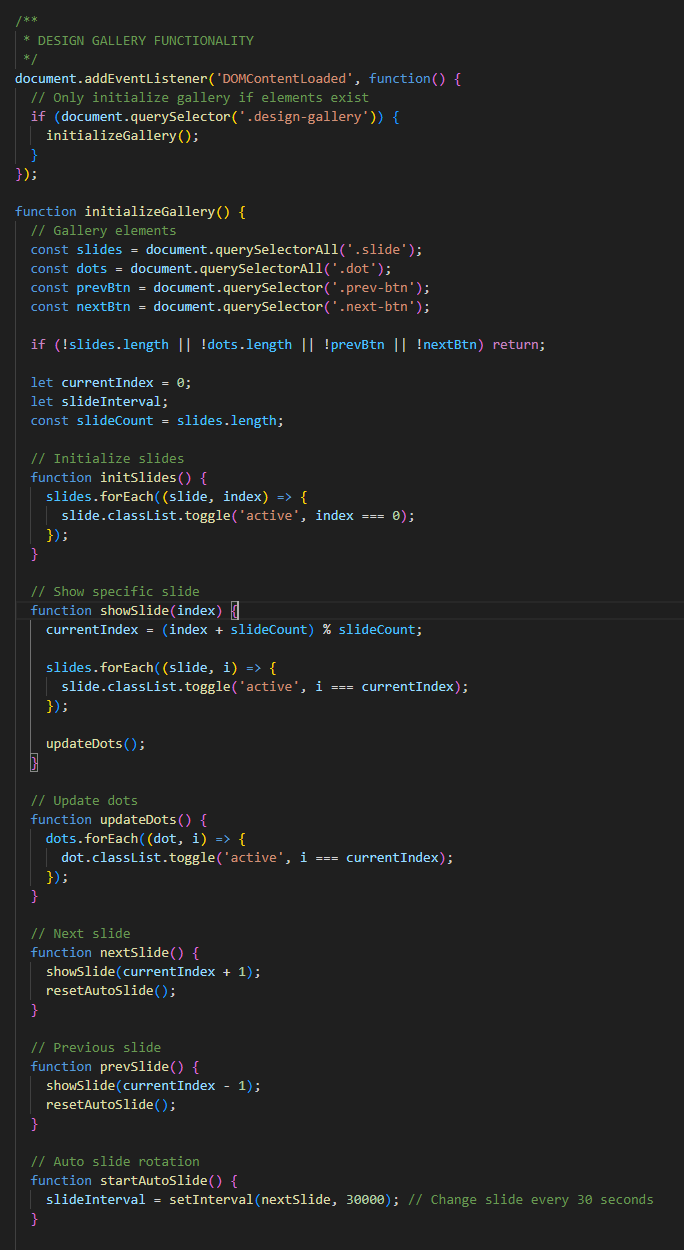
Interactive gallery implementation
Key features of this code:
• Modular Design: Functions are separated by responsibility (showSlide, updateDots, etc.)
• Event Handling: Supports clicks, keyboard navigation, and touch gestures
• Performance: Uses efficient DOM queries and caching
• Accessibility: Includes ARIA labels and keyboard support
Responsive Navigation System
The navigation system adapts seamlessly between desktop and mobile views:
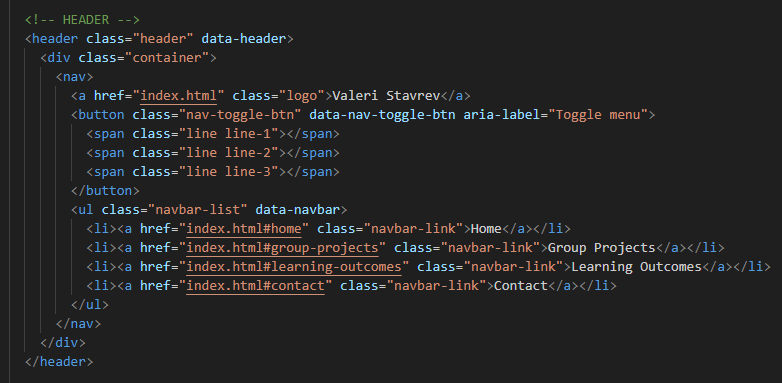
Mobile-first navigation implementation
This showcases:
• Clean event delegation patterns
• State management without frameworks
• Smooth animations using CSS transitions
• Accessibility considerations with proper ARIA attributes
Documentation Standards
I believe clear documentation is as important as the code itself. My documentation philosophy centers on making code self-explanatory while providing context where needed.
Code Comments and JSDoc
I use meaningful comments that explain the "why" rather than the "what":
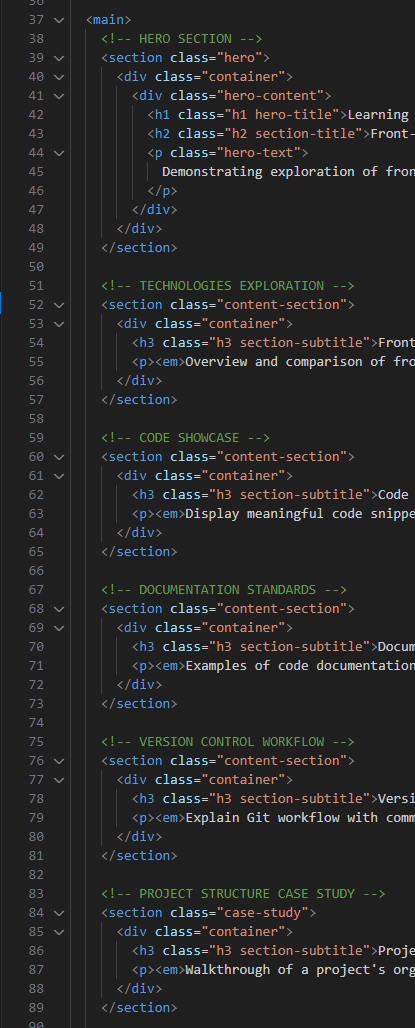
Example of inline documentation
My documentation approach includes:
• Function Documentation: Clear descriptions of parameters, return values, and purpose
• Complex Logic Explanation: Comments for non-obvious implementations
• TODO/FIXME Tags: Tracking improvements and known issues
• README Files: Project setup, features, and usage instructions
Project Documentation Structure
Each project includes comprehensive documentation:
• README.md with project overview and setup instructions
• Inline code comments for complex logic
• CSS organization with clear section headers
• Commit messages that follow conventional commits standard
Version Control Workflow
Version control has been an essential part of my development process. I use Git for tracking changes and GitHub for remote repository hosting.
Repository History
I initially started working on my projects in a private repository, but encountered an issue where I was using the wrong GitHub account. After losing access to that account, I had to recreate the repository and re-upload my work. This is why the current repository shows limited commit history—originally, there were over 39 commits documenting the full development process, but now it appears as a single initial commit due to the re-upload.
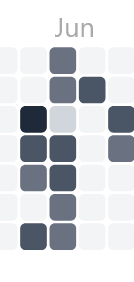
GitHub contribution activity

GitHub private repository
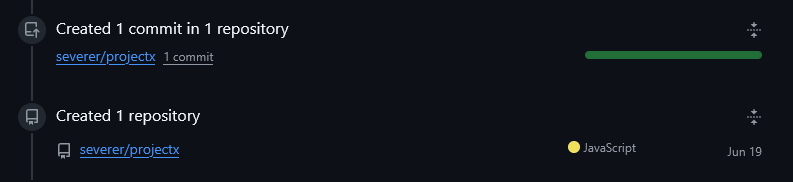
GitHub public repository
My Git workflow includes:
• Meaningful Commits: Each commit represents a logical unit of work
• Branch Strategy: Feature branches for new functionality
• Commit Messages: Following conventional format (feat:, fix:, docs:, etc.)
• Regular Pushes: Keeping remote repository synchronized
Version Control Best Practices
Despite the setback with the repository, I maintain strong version control practices:
• Atomic commits with clear, descriptive messages
• .gitignore for excluding unnecessary files
• Regular backups to prevent future access issues
• Documentation of significant changes in commit messages
Project Structure Case Study: Portfolio Website
Let me walk through the architecture and organization of this portfolio website to demonstrate my approach to project structure and coding decisions.
Directory Structure
The project follows a clear, scalable structure:
          portfolio/
          ├── index.html
          ├── LO1.html - LO5.html
          ├── assets/
          │   ├── css/
          │   │   ├── style.css
          │   │   └── lo-style.css
          │   ├── js/
          │   │   └── script.js
          │   └── images/
          │       ├── lo1/ - lo5/
          │       └── misc/
          └── README.md
Key architectural decisions:
• Separation of Concerns: HTML for structure, CSS for presentation, JS for behavior
• Modular CSS: Base styles in style.css, page-specific in lo-style.css
• Progressive Enhancement: Site works without JavaScript, enhanced with it
• Performance First: Minimal dependencies, optimized assets
Code Organization Principles
The codebase demonstrates several best practices:
• DRY (Don't Repeat Yourself): Reusable components and functions
• Consistent Naming: BEM-inspired class names, descriptive function names
• Mobile-First Design: Base styles for mobile, enhanced for larger screens
• Accessibility: Semantic HTML, ARIA labels, keyboard navigation
Development Trade-offs
Some key decisions and their rationale:
• Chose vanilla JavaScript over frameworks to reduce complexity and improve performance
• Implemented custom gallery instead of using libraries for full control
• Used CSS custom properties for easy theming and maintenance
• Prioritized semantic HTML even when it required more initial setup
Learning Outcomes
Outcomes
These learning outcomes represent key skills and competencies developed throughout my web development education and professional experiences.
LO 1
Mastered front-end web development fundamentals including HTML5, CSS3, and JavaScript to create responsive and accessible user interfaces.
LO 3
Implemented backend solutions using Node.js and database management systems to create full-stack applications with secure data handling.
LO 4
Practiced user-centered design principles and created wireframes and prototypes that prioritize intuitive user experiences.
LO 5
Applied version control with Git and collaborated effectively in team environments to deliver complex web projects on schedule.